MidWestTechService, Parts and Operator's Manuals, in stock and ready to ship!
Fast free USA shippingShips in 1 business daySave 10% on 2 manuals, 15% on 3+

Case Universal Display for 1200 Pivot-Transport Planter Operator's Manual

325 pages · Publication 87542230

$69.59
Fast free USA shippingShips in 1 business daySave 10% on 2 manuals, 15% on 3 or morePay by credit or debit card or with PayPal. No PayPal account needed.
Models
Universal Display for 1200 Pivot-Transport
Serial coverage
Software Version 8.1.*.*
Manual type
Operator's Manual
Pages
325
Publication
87542230
Condition
Brand new
Case Universal Display for 1200 Pivot-Transport Planter Operator's Manual, publication 87542230

What's inside

From the manual's own table of contents: 144 sections, 145 entries. See sample pages (PDF, 565 KB)

General1 topic
  • TABLE OF CONTENTS 1 – INTRODUCTION, DISPLAY MENUS AND CHART
DISPLAY
Display Installation and Removal
DataCard Storage
DataCard Clean up
Screen Care
Storage Case
Display Problems
DESKTOP SOFTWARE
DISPLAY MENUS
Screen Layout
Main Menu
Navigation Bar
Menu Screen Memory
MENU NAVIGATION CHART
Status Bar
Buttons in the Status Bar Area
2 – USER SCREEN SETUP
USER SCREENS
User Screen Overview
USER SCREEN OPERATION: RUN SCREENS
USER SCREEN SETUP
3 – USER SCREEN MODULES
USER SCREEN MODULES
Show all 145 sections
Application Rate Control Modules: Per Planter, Per Side or Per Section
Seed Application
Liquid Fertilizer Application
Master Control and Section Control
Vacuum Fan Operation
Bulk Fill Fan Operation
Prime Control
Ground Speed
Seed Hopper Level
Granular Chemical Hopper Level
Seed Bar Graphs
Area Counters
Marker Control and Marker Advancing
Obstacle Control
Inner Marker
Outer Marker
Free Card Space
GPS Coordinates
As Applied or Prescription Maps
Map Field Marks
4 – PIVOTING THE PLANTER/CONTROLLING MARKERS
PIVOTING THE PLANTER – THREE SECTION HYDRAULIC TONGUE
Pivoting the Planter to Transport Position
Pivoting the Planter From Transport Position
PIVOTING THE PLANTER – TWO SECTION MECHANICAL TONGUE
Setting Toolbar Raise Height
CONTROLLING MARKERS (IF EQUIPPED)
Marker Operation
Automatic Alternating of Outer Markers Only
Automatic Alternating of Both Outer and Inner Markers
Lowering Both Outer Markers to Open a Field
Switching to Outer Marker Alternating Only
5 – PLANTING WITH HYDRAULIC DRIVE PLANTERS
PLANTING WITH HYDRAULIC DRIVE PLANTERS
6 – TIME/UNITS, PLANTER, PRODUCT AND ROW SETUP
DATE, TIME AND UNITS
ADJUSTING THE DISPLAY: PLANTER SETUP SCREEN
Options Installed
Section Setup
Row Setup
Seed Bar Graph
Fertilizer Boost
Speed Sensor Options
GPS Receiver
Miscellaneous
ADJUSTING SEED, FERTILIZER AND FANS: PRODUCT SETUP SCREEN
Seed Applied Rate
Liquid Fertilizer Applied Rate
Vacuum Fan
Bulk Fan
ADJUSTING ACTIVE SENSORS AND ROW UNITS: ROW SETUP SCREEN
Disabling Row Units: Custom Planting
7 – DISTANCE AND FRAME CALIBRATION
DISTANCE CALIBRATION
Overview
Distance Calibration Procedure
Manually Adjusting Distance Cal Values
FRAME CALIBRATION
Limited Raise
Wing Drop
Start Plant
Stop Plant
8 – SEED AND LIQUID FERTILIZER CALIBRATION
PRODUCT APPLICATION CALIBRATION
Seed Calibration Overview
Seed Calibration Procedure
Seed Count Procedure
Granular Chemical Calibration
Liquid Fertilizer Calibration Overview
Orifice/Injector Selection
Liquid Fertilizer Calibration Procedure
Manually Changing Liquid Sensor Value
9 – SAVING AND RESTORING SETUPS
SAVING AND RESTORING SETUPS: CROP CHANGEOVER
Saving Planter Setups
Restoring Planter Setups
Recovery Situations
10 – AS APPLIED AND PRESCRIPTION MAPS
FILE MANAGEMENT FOR MAPPING
Farm and Field Relationship
Understanding Default, Desktop and Planter ID
Simplified Operation
Preventing Data Loss
MAPS: AS APPLIED AND PRESCRIPTION
Prescription Planting/Fertilizing Guidelines
Recording As Applied Seed and/or Fertilizer Data
Renaming a Farm or a Field
Opening a Prescription Map (Seed and/or Fertilizer)
Prescription Map Planting or Fertilizing
11 – FIELD TAGS
ADDING TAGS TO FIELD FILES
Customizing Tags
Modifying Tag Selections
12 – FIELD MARKS
SELECTING MARKS FOR FIELDS
13 – DATACARD MANAGEMENT
MANAGING DATACARD SPACE
Farm and Field Limits
Deleting Data from the Datacard
IMPORTING DEFAULT, DESKTOP OR PLANTER ID SETTINGS
14 – FAULT SCREENS AND POP UP MESSAGES
UTILITY SCREENS
Checking Controller Status: Status Screen
Reviewing Fault Codes: Fault Screen
Checking Seed Sensors: Sensor Screen
Seed Sensor Status Indicator Lamps
Tuning a Controller: Gain Screen
INFORMATIONAL AND FAULT MESSAGES
Information Messages
Fault Messages
15 – WARNING MESSAGES/FAULT CODES
FAULTS, ALARMS AND TROUBLESHOOTING
Universal Display Faults
MIU Fault Codes
MCC1 and MCC2 Fault Codes
APPENDIX – USER SCREEN MODULES GUIDE
USER SCREEN MODULE GUIDE
USER SCREEN WORKSHEETS
Universal Display Plus
Universal Display
DETAIL INDEX

Inside this manual

Real pages from this operator's manual (325 pages). Open the sample pages (PDF, 564 KB)
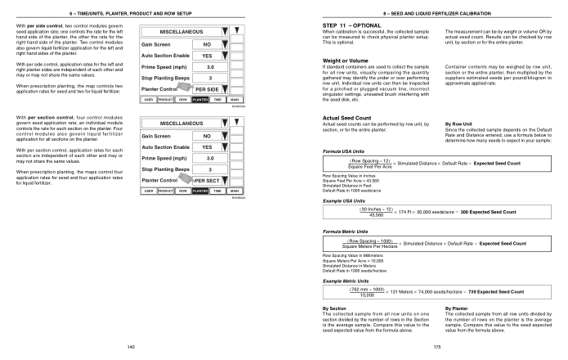
Sample pages from the Case Universal Display for 1200 Pivot-Transport Planter Operator's Manual: Controls and operation, Specifications
  • Controls and operation, page 146: 6 – TIME/UNITS, PLANTER, PRODUCT AND ROW SETUP
  • Specifications, page 181: 8 – SEED AND LIQUID FERTILIZER CALIBRATION

This is an operator's manual

Here's how it compares to the other manual types.

Service manual

Factory repair procedures and technical information such as specifications, troubleshooting, and wiring and hydraulic diagrams, for the models and systems the manual covers. See What's inside for its topics.

This manual

Operator's manual

Safe operation, controls, maintenance schedules, lubrication points, inspections, and basic checks. Repair procedures are in the service manual.

Parts manual

Illustrated diagrams with factory part numbers for identifying components and ordering parts. Repair procedures are in the service manual.

What it's used for

Factory manual for in-house farm and construction shop use. Straightforward, complete, and easy to follow. It contains the OEM information dealership service departments and parts counters use to diagnose problems, identify components, and perform maintenance or repairs correctly.

Service shops and owner/operators who repair their own equipment

Identifying correct parts and seeing how assemblies come apart and go back together

Keeping equipment running with less downtime

Factory manual, 325 pages

Quantity one is the manual described above.

Fast free USA shipping

Ships in 1 business day.

60-day returns

Free if the mistake is ours. A manual ordered in error must come back unopened in its shrink-wrap; you pay return shipping and a 20% restocking fee applies. Return policy

Binder not included

Manuals over about 300 pages may need a standard 3-ring binder, which you can buy locally to keep the pages organized for shop use.

Other editions and similar models

Questions about model, serial number, engine coverage or contents? Contact us before purchasing and we'll help confirm it's the right manual. Please verify the manual type, machine model, serial number range and engine coverage before purchasing: manuals ordered in error carry a 20% restocking fee (return policy).